
Questions?
Call (800) 583-4891
Buyer's Guide · Event Flooring & Turf Protection
Turning a field into an event surface comes down to two questions: which system fits your venue, and whether you need light-duty or heavy-duty panels. Get those right and the floor goes down fast, protects the turf, and tears out clean. Here's how Matrax and OmniDeck compare, how to read LD vs. HD, and how to size your order.
Both systems are interlocking, no-loose-parts panels from Signature Systems, built to protect natural, synthetic, and hybrid fields during concerts, commencements, and on-field events. Both take ADA ramps, install with one or two people, and ship with a 25-panel minimum.
The differences are panel shape, load rating, and how each handles airflow over grass.
4' × 4' × 1.5" · 30.5 lb
225 psi compressive
~13.2 ft² usable per panel
Pedestrian & light-duty
Matrax LD →4' × 4' × 1.5" · 50 lb
300 psi wheel / 450 psi compressive
~13.2 ft² usable per panel
Drivable & staging
Matrax HD →6' × 3' × 1.5" · 36 lb
200 psi capacity
18 ft² per panel
Open-bottom · pedestrian/chairs
OmniDeck LD →The single most important choice is duty rating. Light-duty panels (Matrax LD, OmniDeck LD) are built for foot traffic, chair sets, and lighter loads. Heavy-duty panels (Matrax HD, OmniDeck HD) are the drivable, load-bearing option for access lanes, lifts, carts, forklifts, and stage builds.
The rule of thumb is simple: if anything heavier than people will cross the floor, use HD. There's no partial credit here — a single forklift route or staging pad means HD for those areas, even if the rest of the floor only sees pedestrians.
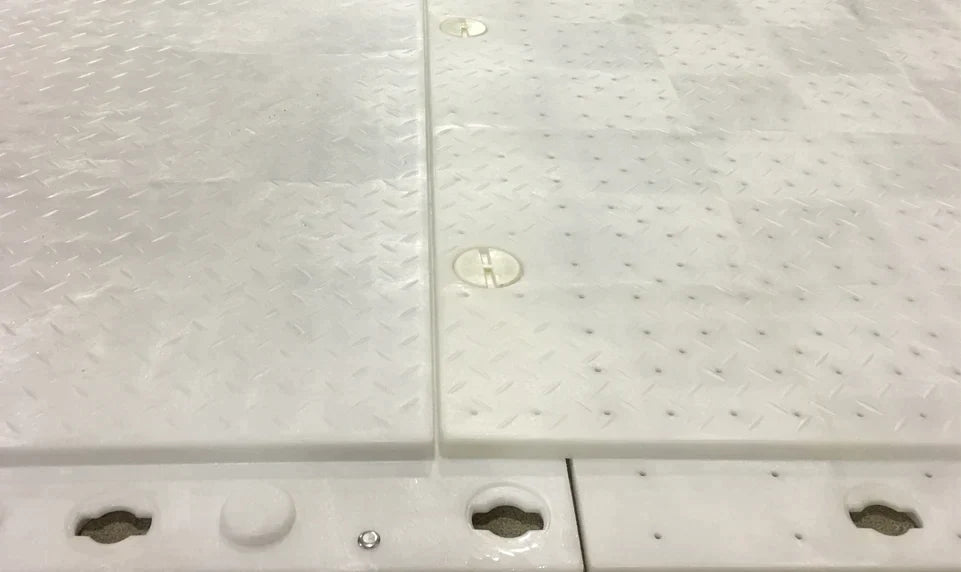
Matrax uses a 4' × 4' panel in translucent virgin HDPE with aeration holes, so light, air, and water still reach natural grass underneath. Overlapping upper and lower flanges with a vertical quarter-turn cam lock create a smooth, trip-resistant surface and keep spills off the turf. HD and LD panels integrate directly, so you can run drivable lanes and pedestrian zones in one continuous floor.


OmniDeck uses a larger 6' × 3' module with a puzzle-piece design that locks in any direction, so crews can build outward north, south, east, and west at once and work around goal posts or fixed objects. Built-in polycarbonate cam locks mean no loose parts. The key split is the bottom: HD is closed-bottom for maximum load and drivability, while LD is open-bottom to promote airflow and drainage over living turf.
In short: reach for Matrax when you want one integrated 4' × 4' system with translucent panels over grass, and OmniDeck when you want a fast, large-format 6' × 3' build with an open-bottom LD option for breathing room over natural fields.
If carts, lifts, forklifts, vehicles, or staging will travel or sit on the panels, specify a heavy-duty panel for those areas — no exceptions. Light-duty is strictly for pedestrian and chair-set zones. When in doubt on a given lane, step up to HD.

Size by coverage, not by gross panel dimensions. A Matrax panel covers about 13.2 ft² usable (16 ft² gross, before flange overlap); an OmniDeck module covers 18 ft². Measure your area, divide by the usable area per panel, and add roughly 5% for overlaps and edge conditions. Both systems carry a 25-panel minimum, and the locking tool, edge pieces, and ramps are sold separately.
What's the heaviest load? Pedestrian only → LD; anything heavier → HD.
Natural grass that needs to breathe? OmniDeck LD's open bottom and Matrax aeration holes help airflow and drainage.
Footprint preference: Matrax 4' × 4' (~13.2 ft² usable) or OmniDeck 6' × 3' (18 ft²).
Coverage area ÷ usable area per panel, then add ~5% for overlaps and edges.
25-panel minimum; add ramps, edge pieces, and a locking tool as needed.
We carry the full Signature Systems lineup — Matrax LD and Matrax HD in the 4' × 4' system, plus OmniDeck LD and OmniDeck HD in the 6' × 3' system — all with free shipping.
Not sure which panel and how many? Run the Event Panel Selector above — it walks through your application, load, and coverage to land on the right panel and count.